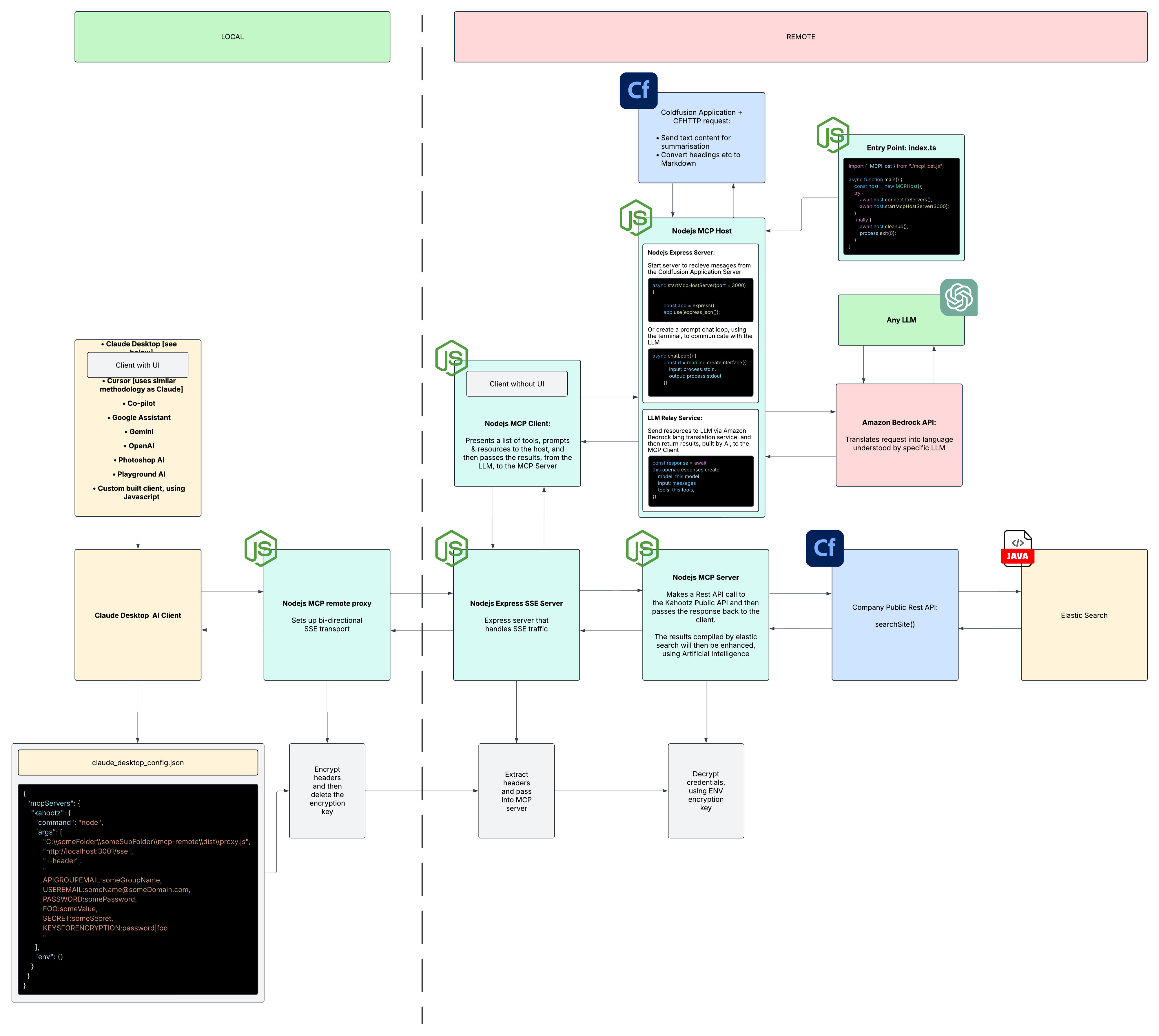
We use CFHTTP to connect to our NodeJS + Bedrock MCP Host/Client/Server.
What advantages does LuCLI add over our set-up?
Is the LuCLI a CommandBox like alternative?
I am kind of interested in the MCP server side of things?
Have you managed to create a an MCP server using Coldfusion?
I have found that I needed to use NodeJs to do this part, because of the amazing library:
I am not sure what your setup is but, to give some background.
LuCLI is meant to be the Swiss Army knife of tools for Lucee. So it is comparative to the great work Ortus has done with Commandbox, just very Lucee-only focussed.
I needed an MCP connection to Bitbucket, I didnt want to drop out to other tools and still wanted to re-use some of the specific commands I have in Bitbucket Module
I realised that exposing modules as MCP (JSON-RCP) makes sense to me, since we also have a daemon and LSP protocols enabled for other tooling (lucli daemon --port 10000 and lucli daemon --port 5000 --lsp)
This makes making MCP clients a breeze and even better, using them and testing them is a breeze since they are literally command line tools anyway
Does that make some sense with regards to the why?
Whatever you do in the modile to connect to some CFML based server is up to the module , whether you are using rest or direct webservices (which If I recall Lucee ↔ Lucee webservices are pretty fast)
I am not quite sure why you are sending your BitBucket module to your MCP server?
What is the purpose of your BitBucket module? And when you say module, how would you define this? Is it Coldfusion based?
This would suggest that BitBucket is an MCP server and LuCLI can interact with it via Stdio. The second ARG here is the MCP server target, as far as I can remember?
@markdrew Would I be able to see your BitBucket module.
I am intrigued to see how it is used, as an MCP server?
I had a look at:
But I didn’t see any CFCs in there. It would be great if you could add an MCP example, in the examples folder.
This would act as both a module & an MCP example, all in one go.