Redis Extension for Jakarta 4.0.0

Hi All,

I’m using Lucee 7 /tomcat 10 on Rocky Linux 9

I’m attempting to setup Redis for sessions. I have a dedicated redis server running on another Rocky Linux 9 vm.

I can’t get past installing the Redis Extension for Jakarta - Notes say to use 4.0 for my configuration

https://download.lucee.org/#60772C12-F179-D555-8E2CD2B4F7428718

Here’s my install process

sudo systemctl stop tomcat
cd /tmp
curl -LO https://ext.lucee.org/redis-extension-4.0.0.0.lex
sudo cp redis-extension-4.0.0.0.lex /tomcat/webapps/myapp/WEB-INF/lucee-server/deploy/
sudo systemctl restart tomcat

But any attempt to use this plugin fails, with debugging info suggesting the extension is not installed

and if I poke around, I can’t find any evidence of it. It disappears from the /deploy folder but then nothing

[deploy]$ ls /tomcat/webapps/detailsat/WEB-INF/lucee-server/context/lib/ | grep -i redis
[deploy]$

Any attempt to use it in code results with something like

Message cannot load class through its string name, because no definition for the class with the specified name [org.lucee.redis.RedisCache] could be found; failed to load class with multiple classloaders, every cause in the stacktrace represents a classloader

Here’s how I’m declaring my redis cache definitions in Application.cfc

    this.cache.connections = {
        redis_main = {
            class: "org.lucee.redis.RedisCache",
            storage: true,
            custom: {
                host: server.system.environment.REDIS_MAIN_HOST & "." & server.system.environment.APP_DOMAIN,
                port: 6380, // TLS port
                password: server.system.environment.REDIS_PASS,
                ssl: true,
                timeout: 2000,
                database: 0,
                minIdle: 5,
                maxIdle: 20,
                maxTotal: 50
            },
            default: "object"
        },

        redis_sessions = {
            class: "org.lucee.redis.RedisCache",
            storage: true,
            custom: {
                host: server.system.environment.REDIS_MAIN_HOST & "." & server.system.environment.APP_DOMAIN,
                port: 6380, // TLS port
                password: server.system.environment.REDIS_PASS,
                ssl: true,
                database: 1
            },
            default: "session"
        }
    };

    this.cache.object = "redis_main";

// We intentionally do NOT use native CF sessions for auth state; we use Redis.
this.sessionManagement = true;
this.sessionStorage = "redis_sessions";
this.sessionTimeout = createTimeSpan(0, 7, 0, 0); // 7 days

Thoughts? I’m declaring in Application.cfc because many of the parameters are based on environment vars and that isn’t going to work with .CFConfig.json because of how in interprets vars at runtime.
Do you have the opportunity to drop the Lucee version down to 6.x for a test to see if you same config works there? I’ve found that if the extension hasn’t been fully updated to use the new java naming conventions that the install/startup silently fails with no errors or log messages.

no, I dont really want to mess with setting up lucee 6 atm.

So far, what I’ve figured out is that I have to declare class as
'class: “lucee.extension.io.cache.redis.simple.RedisCache”

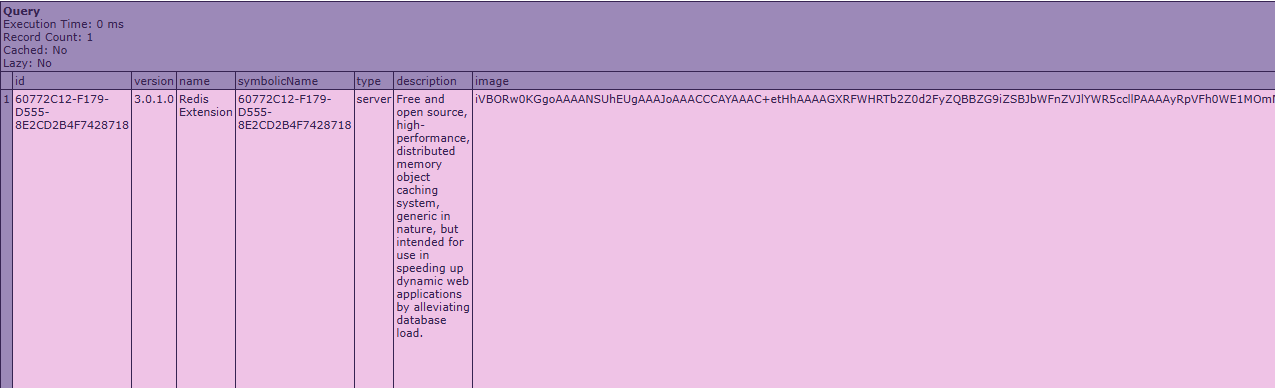
and that when I install the 4.0.0 build, it still shows as version 3.0.1.0 when I run

cfdump var=“#extensionList()#”

And a few tests show it now responding. But I’m not sure if I’m using 4.0.0 or 3.0.1.0

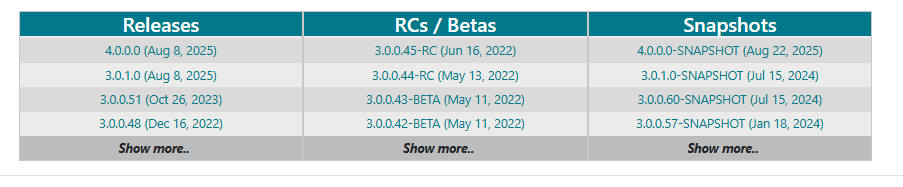
Considering the 4.0.0 build and 3.0.1.0 show as uploaded as the very same date on the lucee extensions download page makes me think the 4.0.0 build is just 3.0.1.0 modded for Jakarta? but the name didn’t get changed somewhere.

Looking through my app files, I can’t find anywhere that jumps out to me as showing that the extension was successfully installed. I did eventually look in

/tomcat/webapps/myapp/WEB-INF/lucee-server/context/extensions/available

and found two matches

WEB-INF/lucee-server/context/extensions/available/60772C12-F179-D555-8E2CD2B4F7428718-3.0.1.0.lex

WEB-INF/lucee-server/context/extensions/available/60772C12-F179-D555-8E2CD2B4F7428718-4.0.0.0.lex

So it appears I have both the 4.0.0.0.lex and the 3.0.1.0.lex there, and it appears they both have the same symbolic name of ‘60772C12-F179-D555-8E2CD2B4F7428718’ aka

60772C12-F179-D555-8E2CD2B4F7428718-3.0.1.0.lex
60772C12-F179-D555-8E2CD2B4F7428718-4.0.0.0.lex

Keep in mind, I haven’t attempted to install 3.0.1.0.lex at any point

So they both have the same prefix, which matches the symbolic name shown when I dump the available extensions. But now I’m not sure which one I’m using.

ok, i looked through my deploy.log and found

“INFO”,“ControllerThread:27”,“01/31/2026”,“10:41:55”,“”,“deploy handler”,“found [/tomcat/webapps/myapp/WEB-INF/lucee-server/deploy/redis-extension-4.0.0.0.lex] in deploy folder”

“INFO”,“ControllerThread:27”,“01/31/2026”,“10:41:55”,“”,“extension”,“Deploy context [admin/cdriver/Redis.cfc]”

“INFO”,“ControllerThread:27”,“01/31/2026”,“10:41:55”,“”,“extension”,“Deploy fld [lucee-redis.fld]”

“INFO”,“main”,“01/31/2026”,“10:41:59”,“”,“request”,“No extension(s) found to add/install”

“INFO”,“main”,“01/31/2026”,“10:42:00”,“”,“extension”,“Found the extension [60772C12-F179-D555-8E2CD2B4F7428718;symbolic-name=60772C12-F179-D555-8E2CD2B4F7428718;version=4.0.0.0] in the installed folder that is not present in the configuration in any version, so we will uninstall it”

“INFO”,“main”,“01/31/2026”,“10:42:00”,“”,“extension”,“Remove FLD file [lucee-redis.fld]”

“INFO”,“main”,“01/31/2026”,“10:42:00”,“”,“extension”,“Remove TLD file lucee-redis.tldx”

“INFO”,“main”,“01/31/2026”,“10:42:00”,“”,“extension”,“remove admin/cdriver/Redis.cfc”

“INFO”,“main”,“01/31/2026”,“10:42:00”,“”,“extension”,“Remove cache handler [class:lucee.extension.io.cache.redis.simple.RedisCache;name:redis.extension;version:4.0.0.0;] from extension [Redis Extension for Jakarta EE (Lucee 7+):4.0.0.0]”

“INFO”,“main”,“01/31/2026”,“10:42:00”,“”,“extension”,“removed extension [60772C12-F179-D555-8E2CD2B4F7428718;symbolic-name=60772C12-F179-D555-8E2CD2B4F7428718;version=4.0.0.0]”

“INFO”,“main”,“01/31/2026”,“10:42:02”,“”,“request”,“No extension(s) found to add/install”

“INFO”,“main”,“01/31/2026”,“10:43:31”,“”,“request”,“No extension(s) found to add/install”

Grok says

The deploy.log shows the exact problem: Lucee finds the redis-extension-4.0.0.0.lex file in deploy, starts processing it (deploys the admin driver CFC, FLD, TLD files), but then a cleanup/background process detects the extension in the /installed/ folder as “not present in the configuration in any version” → it uninstalls/removes everything it just added.

This is a known race condition/bug in Lucee’s extension installer (tracked in tickets like LDEV-5885 on Jira: “Cleanup process deletes extension files while they are being installed”). It happens more often with deploy-folder installs on startup/first poll:

** ControllerThread starts install → copies/extracts to installed/config.*
** Cleanup (separate thread or next poll) sees the new extension not yet fully synced in config state → treats it as orphan → uninstalls.*
** Result: Partial deploy (some files like FLD/TLD might linger briefly), but cache handler and bundles get removed → extension appears broken or missing in admin/extensionList() (your version stuck at 3.0.1.0 is likely a remnant from prior install).*

Your code still “works” because:

** Some bundles/JARs from the old 3.0.1.0 or partial 4.0.0.0 load.*
** The lucee.extension.io.cache.redis.simple.RedisCache class resolves (no class-not-found error).*
** Basic cachePut/Get succeeds (simple operations don’t hit missing deps).*

But it’s unreliable—clustering, advanced features (TLS, pooling), or heavy use might fail silently or on restart.