Lucee 6 Boncode Connection Problems

We recently upgraded to Lucee 6.2.3.35 (from 5.4). We have a couple Lucee 6 servers, dedicated to background jobs via Lucee scheduled tasks that are getting “stuck” where Boncode stops talking to Tomcat. Requests to the app hang forever. I think the issue is with creating connections.

The scheduled tasks execute on the same server http://mysite.com/job1.cfm with a host entry of 127.0.0.1 mysite.com
They run frequently (every 30 seconds to 1 minute) and can run for a 30-60 seconds. Basically always running.

  • Since 2/27/2026, the two jobs servers have done this 5 or 6 times.
  • During each outage, the Lucee admin was running fine via http://127.0.0.1:8888/lucee/admin/server.cfm.
  • Each time it occurred between 00:00 (midnight) and 00:30 local time, but on different days of the week and with different amounts of time between outages (there has to be something with the time of day, I’m just not sure what yet)

Lucee has 28GB ram and I haven’t observed any resource issues during the outages (CPU, memory, etc…)

The fix has been to restart the application pool or just restart IIS.

I’ve tried tweaking the Boncode settings (one change at a time, none of them have stopped the problem)

  • Changed <Server>localhost</Server> to <Server>::1</Server> to match the Tomcat connector
  • Changed <MaxConnections>1000</MaxConnections> to <MaxConnections>0</MaxConnections> to disable connection pooling
  • Started logging Boncode connections

We have NOT had this problem:

  • On any of our 3 other Lucee 6 servers (these handle user requests for our application)
  • With our previous stack of Windows 2016 + Boncode + Tomcat 9 + Lucee 5 + FusionReactor which ran for many years

Boncode settings

<Settings>
<Server>::1</Server>
<Port>8009</Port>
<EnableRemoteAdmin>False</EnableRemoteAdmin>
<EnableHeaderDataSupport>True</EnableHeaderDataSupport>
<ForceSecureSession>False</ForceSecureSession>
<AllowEmptyHeaders>False</AllowEmptyHeaders>
<MaxConnections>0</MaxConnections>
<SkipIISCustomErrors>True</SkipIISCustomErrors>
<LogLevel>2</LogLevel>
<LogDir>D:\IISSharedConfig\BoncodeLogs</LogDir>
<FlushThreshold>0</FlushThreshold>
<PacketSize>65536</PacketSize>
</Settings>

Tomcat connector settings (server.xml)

<Connector port="8009" protocol="AJP/1.3"
   connectionTimeout="121000"
   maxConnections="1000"
   keepAliveTimeout="-1"
   redirectPort="8443"
   address="::1"
   packetSize="65536"
   secretRequired="false" />

Don’t forget to tell us about your stack!

OS: Windows 2022
Java Version: 21.0.9 (Eclipse Adoptium) 64bit
Tomcat Version: 11.0.13
Lucee Version: 6.2.3.35
If restarting IIS fixes it (without touching Tomcat), then Tomcat is fine. The problem is entirely on the Boncode/IIS side. Boncode is getting into a stuck state and can’t recover.

The key logs are:

  1. Boncode logs (D:\IISSharedConfig\BoncodeLogs) - bump LogLevel to 3 or 4 and check what’s happening at midnight on outage dates
  2. IIS Event Logs - specifically look for app pool recycle events around midnight

And the big question: do you have an IIS app pool recycle scheduled?

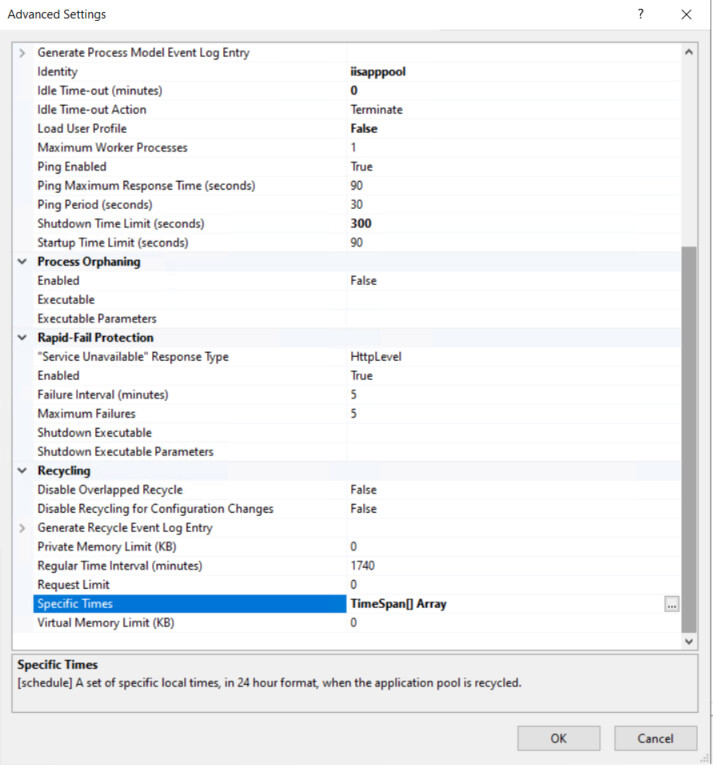
IIS app pools have a default periodic restart (every 1740 minutes / 29 hours) which drifts, but heaps of people set a “Specific Time” recycle at midnight. If the app pool recycles, the w3wp.exe process restarts, Boncode reinitialises… but if there are long-running requests (your 30-60 second jobs) in flight during the recycle, Boncode might not re-establish connections properly.

Check in IIS Manager: Application Pools > your pool > Advanced Settings > Recycling - look at:

  • Regular Time Interval
  • Specific Times
  • Idle Timeout

If there’s a midnight recycle configured, that’s almost certainly your trigger. The recycle kills in-flight Boncode connections mid-request, and Boncode doesn’t recover cleanly.

Thanks for the reply!

Ok it happened again today (3/18) around 12:15am. In IIS → Worker Threads I could see all the requests still active, yet on the Lucee side (from FusionReactor) requests looked fine.

Boncode’s logs
I bumped loglevel to 3 and started seeing these errors during the outage

2026-03-18 00:40:08 1.0.41 ERROR 

Thread was being aborted.
   at System.Net.UnsafeNclNativeMethods.OSSOCK.recv(IntPtr socketHandle, Byte* pinnedBuffer, Int32 len, SocketFlags socketFlags)
   at System.Net.Sockets.Socket.Receive(Byte[] buffer, Int32 offset, Int32 size, SocketFlags socketFlags, SocketError& errorCode)
   at System.Net.Sockets.NetworkStream.Read(Byte[] buffer, Int32 offset, Int32 size)
   at BonCodeAJP13.BonCodeAJP13ServerConnection.ComunicateWithTomcat()
2026-03-18 00:40:08 1.0.41 ERROR 

Thread was being aborted.
   at System.Net.UnsafeNclNativeMethods.OSSOCK.recv(IntPtr socketHandle, Byte* pinnedBuffer, Int32 len, SocketFlags socketFlags)
   at System.Net.Sockets.Socket.Receive(Byte[] buffer, Int32 offset, Int32 size, SocketFlags socketFlags, SocketError& errorCode)
   at System.Net.Sockets.NetworkStream.Read(Byte[] buffer, Int32 offset, Int32 size)
   at BonCodeAJP13.BonCodeAJP13ServerConnection.ComunicateWithTomcat()
2026-03-18 00:40:08 1.0.41 ERROR 

Thread was being aborted.
   at System.Net.UnsafeNclNativeMethods.OSSOCK.recv(IntPtr socketHandle, Byte* pinnedBuffer, Int32 len, SocketFlags socketFlags)
   at System.Net.Sockets.Socket.Receive(Byte[] buffer, Int32 offset, Int32 size, SocketFlags socketFlags, SocketError& errorCode)
   at System.Net.Sockets.NetworkStream.Read(Byte[] buffer, Int32 offset, Int32 size)
   at BonCodeAJP13.BonCodeAJP13ServerConnection.ComunicateWithTomcat()
2026-03-18 00:40:08 1.0.41 ERROR 

IIS Event Logs
This is odd. I see auto-restarts of the application pool when we don’t have the problem, but no entries leading up to when we do have problems…

A worker process with process id of '5272' serving application pool 'emailer.emfluence.com' has requested a recycle because the worker process reached its allowed processing time limit.

Here are my application pool settings. I don’t see a midnight recycle configured. The Idle time-out is 0…is that bad? We have another jobs-only server with the same configuration that hasn’t had this issue. It does run fewer jobs.

do you have something like

<RequestTimeout>600000</RequestTimeout>

in your boncode settings? look like some jobs are simply taking longer and boncode is killing them off for running too long?

I don’t have a request timeout defined in BonCode. These jobs run all day every day (except sometimes between 12:00-12:30am, lol)

Boncode settings

<Settings>
<Server>::1</Server>
<Port>8009</Port>
<EnableRemoteAdmin>False</EnableRemoteAdmin>
<EnableHeaderDataSupport>True</EnableHeaderDataSupport>
<ForceSecureSession>False</ForceSecureSession>
<AllowEmptyHeaders>False</AllowEmptyHeaders>
<MaxConnections>0</MaxConnections>
<SkipIISCustomErrors>True</SkipIISCustomErrors>
<LogLevel>2</LogLevel>
<LogDir>D:\IISSharedConfig\BoncodeLogs</LogDir>
<FlushThreshold>0</FlushThreshold>
<PacketSize>65536</PacketSize>
</Settings>

Tomcat connector settings (server.xml)

<Connector port="8009" protocol="AJP/1.3"
   connectionTimeout="121000"
   maxConnections="1000"
   keepAliveTimeout="-1"
   redirectPort="8443"
   address="::1"
   packetSize="65536"
   secretRequired="false" />

This is interesting (not sure how I didn’t see this before!)

These are the first few entries of the Boncode log each day. The days with the error right at midnight are the days we had issues (3/15, 3/17, 3/18).

2026-03-12 00:00:00 BonCode AJP Connenctor version 1.0.41
2026-03-12 00:00:00 New Connection 287 of 0 to tomcat: [::1]:8009 ID: 273 [T-63]
2026-03-12 00:00:00 New Connection 289 of 0 to tomcat: [::1]:8009 ID: 275 [T-85]
...
2026-03-13 00:00:00 BonCode AJP Connenctor version 1.0.41
2026-03-13 00:00:00 New Connection 416 of 0 to tomcat: [::1]:8009 ID: 210 [T-63]
2026-03-13 00:00:00 New Connection 417 of 0 to tomcat: [::1]:8009 ID: 211 [T-5]
...
2026-03-14 00:00:00 BonCode AJP Connenctor version 1.0.41
2026-03-14 00:00:00 New Connection 170 of 0 to tomcat: [::1]:8009 ID: -67 [T-43]
2026-03-14 00:00:00 New Connection 170 of 0 to tomcat: [::1]:8009 ID: -66 [T-117]
...
2026-03-15 00:00:00 BonCode AJP Connenctor version 1.0.41
2026-03-15 00:00:00 1.0.41 ERROR 
TCP Client level -- Server/Port:::1/8009
The source was not found, but some or all event logs could not be searched.  Inaccessible logs: Security, State.
   at System.Diagnostics.EventLog.FindSourceRegistration(String source, String machineName, Boolean readOnly, Boolean wantToCreate)
   at System.Diagnostics.EventLog.SourceExists(String source, String machineName, Boolean wantToCreate)
   at System.Diagnostics.EventLog.SourceExists(String source)
   at BonCodeAJP13.BonCodeAJP13Logger.RecordSysEvent(String message, EventLogEntryType eType)
   at BonCodeAJP13.BonCodeAJP13Logger.LogMessage(String message, Int32 minLogLevel)
   at BonCodeAJP13.BonCodeAJP13ServerConnection.HandleConnection()
   at BonCodeAJP13.BonCodeAJP13ServerConnection.p_CreateConnection(BonCodeAJP13PacketCollection packetsToSend)
2026-03-15 00:00:00 1.0.41 ERROR 
Stream Close:
Object reference not set to an instance of an object.
   at BonCodeAJP13.BonCodeAJP13ServerConnection.ConnectionError()
2026-03-15 00:00:00 New Connection 407 of 0 to tomcat: [::1]:8009 ID: 238 [T-31]
...
2026-03-16 00:00:00 BonCode AJP Connenctor version 1.0.41
2026-03-16 00:00:00 New Connection 5 of 0 to tomcat: [::1]:8009 ID: -28 [T-75]
2026-03-16 00:00:00 New Connection 6 of 0 to tomcat: [::1]:8009 ID: -27 [T-70]
...
2026-03-17 00:00:00 BonCode AJP Connenctor version 1.0.41
2026-03-17 00:00:00 1.0.41 ERROR 
TCP Client level -- Server/Port:::1/8009
The source was not found, but some or all event logs could not be searched.  Inaccessible logs: Security, State.
   at System.Diagnostics.EventLog.FindSourceRegistration(String source, String machineName, Boolean readOnly, Boolean wantToCreate)
   at System.Diagnostics.EventLog.SourceExists(String source, String machineName, Boolean wantToCreate)
   at System.Diagnostics.EventLog.SourceExists(String source)
   at BonCodeAJP13.BonCodeAJP13Logger.RecordSysEvent(String message, EventLogEntryType eType)
   at BonCodeAJP13.BonCodeAJP13Logger.LogMessage(String message, Int32 minLogLevel)
   at BonCodeAJP13.BonCodeAJP13ServerConnection.HandleConnection()
   at BonCodeAJP13.BonCodeAJP13ServerConnection.p_CreateConnection(BonCodeAJP13PacketCollection packetsToSend)
2026-03-17 00:00:00 1.0.41 ERROR 
Stream Close:
Object reference not set to an instance of an object.
   at BonCodeAJP13.BonCodeAJP13ServerConnection.ConnectionError()
2026-03-17 00:00:00 New Connection 386 of 0 to tomcat: [::1]:8009 ID: -7 [T-23]
...
2026-03-18 00:00:00 BonCode AJP Connenctor version 1.0.41
2026-03-18 00:00:00 1.0.41 ERROR 
TCP Client level -- Server/Port:::1/8009
The source was not found, but some or all event logs could not be searched.  Inaccessible logs: Security, State.
   at System.Diagnostics.EventLog.FindSourceRegistration(String source, String machineName, Boolean readOnly, Boolean wantToCreate)
   at System.Diagnostics.EventLog.SourceExists(String source, String machineName, Boolean wantToCreate)
   at System.Diagnostics.EventLog.SourceExists(String source)
   at BonCodeAJP13.BonCodeAJP13Logger.RecordSysEvent(String message, EventLogEntryType eType)
   at BonCodeAJP13.BonCodeAJP13Logger.LogMessage(String message, Int32 minLogLevel)
   at BonCodeAJP13.BonCodeAJP13ServerConnection.HandleConnection()
   at BonCodeAJP13.BonCodeAJP13ServerConnection.p_CreateConnection(BonCodeAJP13PacketCollection packetsToSend)
2026-03-18 00:00:00 1.0.41 ERROR 
Stream Close:
Object reference not set to an instance of an object.
   at BonCodeAJP13.BonCodeAJP13ServerConnection.ConnectionError()
2026-03-18 00:00:00 New Connection 364 of 1000 to tomcat: [::1]:8009 ID: 338 [T-79]

I created the Source for the Windows Logs as described here BonCode Apache Tomcat AJP 1.3 Connector

We’ll see if that reveals any more information.

New-EventLog –LogName Application –Source "BonCodeConnector"

haha, beat me to the same solution

gonna add this to the lucee installer

https://luceeserver.atlassian.net/browse/LDEV-6164

You think that event source not being defined is the cause of the problem? I was getting excited, but now I’m wondering if it is just saying “FYI, I tried to log something to the event viewer but couldn’t” while the real problem was what it logged next in the log file:

2026-03-15 00:00:00 1.0.41 ERROR 
Stream Close:
Object reference not set to an instance of an object.
   at BonCodeAJP13.BonCodeAJP13ServerConnection.ConnectionError()

I’ll be THRILLED if it’s the cause :slight_smile:

1 Like

Registering the event source didn’t fix it :frowning:

But it did log some new errors to the event log right at midnight. Ironically the errors are about Boncode being unable to write to it’s log…

Event ID 418

Error during log write : The process cannot access the file 'D:\IISSharedConfig\BoncodeLogs\BonCodeAJP13Connection_1_EMFL-AWS-WEB-13_20260319.log' because it is being used by another process.

EventID 417 (3 of the same error)

ProcessRequest: The process cannot access the file 'D:\IISSharedConfig\BoncodeLogs\BonCodeAJP13Connection_1_EMFL-AWS-WEB-13_20260319.log' because it is being used by another process.    at System.IO.__Error.WinIOError(Int32 errorCode, String maybeFullPath)
   at System.IO.FileStream.Init(String path, FileMode mode, FileAccess access, Int32 rights, Boolean useRights, FileShare share, Int32 bufferSize, FileOptions options, SECURITY_ATTRIBUTES secAttrs, String msgPath, Boolean bFromProxy, Boolean useLongPath, Boolean checkHost)
   at System.IO.FileStream..ctor(String path, FileMode mode, FileAccess access, FileShare share, Int32 bufferSize, FileOptions options, String msgPath, Boolean bFromProxy, Boolean useLongPath, Boolean checkHost)
   at System.IO.StreamWriter.CreateFile(String path, Boolean append, Boolean checkHost)
   at System.IO.StreamWriter..ctor(String path, Boolean append, Encoding encoding, Int32 bufferSize, Boolean checkHost)
   at System.IO.StreamWriter..ctor(String path, Boolean append)
   at System.IO.File.AppendText(String path)
   at BonCodeAJP13.BonCodeAJP13Logger..ctor(String fileName, Mutex loggerMutex)
   at BonCodeAJP13.BonCodeAJP13ServerConnection.CheckMutex()
   at BonCodeIIS.BonCodeCallHandler.ProcessRequest(HttpContext context)

I’m wondering if just turning off logging will fix the error…

In the meantime, I have a Powershell script ping the server every minute and restart the application pool if it gets a couple of timeouts in a row. Worked like a charm last night.

There are updated DLLs as an artifact at the bottom of this page

I haven’t had any problems across 3 servers since disabling logging. No other changes were made.

@Bilal went further! there’s a whole new version

Version 1.0.50 Updates:

Fix: fix logging deadlock that caused failures around midnight when we had log file switches
Fix: connection timeout
Fix: socket leak bugs
Fix: correct release version in connector
Fix: edge case bugs and code technical debt
Add: basic integration test via github CI/CD
Add: comprehensive unit tests for all classes and seperate test project
Upd: class disposing logic to ensure we do not close connection early
Upd: Github documentation
Add: clearer log entries
Upd: mark obsolete constructor calls for future removal
Add: create package capture log mode 5 and infrastructure
Add: create test cfm pages for standard packets
Add: Loop detection and abort when we have MOD_CFML or other looping

Let me see if you see anything else.