Hi Michael
Sorry, to hijack this thread, but have you managed to get Lucee 6.2 working with docker?
We are having serious issues. Lucee 6.1 is fine but we cannot get Lucee 6.2 work.
https://luceeserver.atlassian.net/browse/LDEV-6074
Docker Image: lucee/lucee:6.2 (image ID: e4cc05d6ef9d, created ~4 weeks ago)
Tomcat Version: 11.0.15 (bundled in image)
Java Version: OpenJDK 21.0.9+10-LTS
Apache 2.4
Yes, we use Docker for Lucee 6.1, 6.2 and 7.0lucee/lucee:6.2 image, we use the tomcat base 11.0-jdk21-temurin-noble image and copy all lucee files.
Charlesr:
Sorry, to hijack this thread, but have you managed to get Lucee 6.2 working with docker?
We are having serious issues. Lucee 6.1 is fine but we cannot get Lucee 6.2 work.
I have closed that ticket, please never hijack threads or file such support tickets before we have triaged on the mailing list
happy to help, but let’s just follow up here
1 Like
OK. I see. I will try that version, because it looks like it doesn’t use NGinx and we are using Apache 2.4 as our webserver.
Thanks. This is very helpful.
And thanks to @Zackster for testing my issue so quickly. Much appreciated.
Next time I will raise the issue within the community first.
Apologies.
So, can I ask, if I use:
lucee/lucee:6.2
Does this pull:
lucee/lucee:6.2.0
Because, most AI agents thinks that it brings back the latest version, which would actually make sense, because how would the average user know what the latest version is?
I mean unless you had told me that:
lucee/lucee:6.2.4.24-nginx-tomcat11.0-jdk21-temurin-noble
Was the latest version, I would never have been able to predict this? So it seems sensible that if a Dev uses
lucee/lucee:6.2
That because the patch version isn’t explicitly used, then it should bring back the latest stable version.
yeah 6.2 pulls that latest stable 6.2, version i.e. currently 6.2.4
but that’s shitty dev ops, as now your app config is not stable over time, hence why I said, use pinned versions
Always, treat you AI like an intern with a coke habit, educate them using AGENTS.md / CLAUDE.md with rules, like don’t wrap everything in try catch
as for apache, we have multiple different images with and without nginx
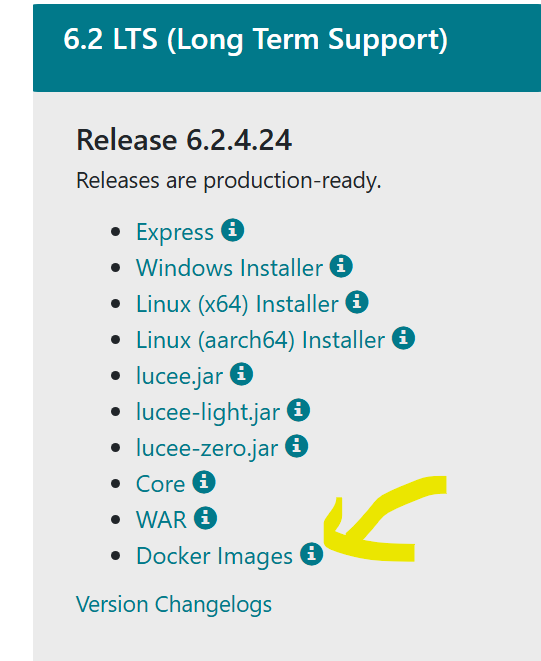
https://download.lucee.org/
which leads to lucee/lucee - Docker Image
1 Like
Intern with a coke habit
We already have plenty of those
Docker-compose.yml
version: '3.8'

services:
  apache:
    image: httpd:2.4
    ports:
      - "8080:80"
      - "8443:443"
    volumes:
      - C:/[redacted company name]/webroot:/usr/local/apache2/htdocs:ro
      - ./apache/httpd.conf:/usr/local/apache2/conf/httpd.conf:ro
      - ./apache/certs/fullchain.pem:/etc/ssl/certs/fullchain.pem:ro
      - ./apache/certs/privkey.pem:/etc/ssl/private/privkey.pem:ro
    depends_on:
      - tomcat-lucee6
    networks:
      - [redacted company name]-network

  tomcat-lucee6:
    image: lucee/lucee:6.2
    privileged: true
    expose:
      - "8888"
      - "8009"
    command: ["/bin/bash", "/mount-share.sh"]
    volumes:
      - ./mount-share.sh:/mount-share.sh:ro
      - C:/[redacted company name]/webroot:/var/www
      - C:/[redacted company name]/webroot/WEB-INF-lucee62:/var/www/WEB-INF:rw
      - C:/[redacted company name]/docker/lucee62-docker-config:/opt/lucee/server:rw
      - ./tomcat/server.xml:/usr/local/tomcat/conf/server.xml:ro
      - C:/[redacted company name]/build/java/runtime-lucee62/lib:/opt/lucee/server/lucee-server/lucee-server/context/lib/[redacted company name]:ro
      - C:/[redacted company name]/build/java/runtime-lucee62/inovem-lucee-8.3.jar:/opt/lucee/server/lucee-server/lucee-server/context/lib/inovem-lucee-8.3.jar:ro
    environment:
      - LUCEE_ADMIN_PASSWORD=[redacted password]
      - JAVA_OPTS=-Xms6144m -Xmx6144m -Dinovem.ts.prefs=[redacted path]
      - LUCEE_QUERY_ALLOWEMPTYASNULL=true
    networks:
      - [redacted company name]-network

networks:
  [redacted company name]-network:
    driver: bridge
in my experience, mounting volumes like that is really terrible for performance
When we use this docker-compose.yml
We find that this creates an empty WEB-INF, because our WEB-INF-lucee62 is empty. Now when we run this, it works, but we run into problems when we need the web.xml to kick in, because there is no web.xml. But we can get the Lucee Admin up and we can get to our website’s login page.
When we do:
# - C:/[redacted company name]/webroot/WEB-INF-lucee62:/var/www/WEB-INF:rw
We get the error I described in the bug report? And the server does not even start?
When we ran your suggestion:
docker run -d -p 8889:8888 --name lucee-test lucee/lucee:6.2
It worked fine, but doing:
PS C:\Kahootz\docker\docker-lucee61> docker exec lucee-test cat /var/www/WEB-INF/web.xml > C:\Kahootz\docker\lucee62-working-web.xml
cat: /var/www/WEB-INF/web.xml: No such file or directory
So, it seems like lucee/lucee:6.2 does not create a web.xml
In single mode, there is no WEB-INF anyway more
are using using any old 5.4 style xml config, rather than cfconfig? that defaults back to multi mode, which has WEB-INF
OK. We found the problem. It was ridiculously simple:
web.xml:
<?xml version="1.0" encoding="UTF-8"?>
<web-app xmlns="https://jakarta.ee/xml/ns/jakartaee"
         xmlns:xsi="http://www.w3.org/2001/XMLSchema-instance"
         xsi:schemaLocation="https://jakarta.ee/xml/ns/jakartaee
                             https://jakarta.ee/xml/ns/jakartaee/web-app_6_0.xsd"
         version="6.0">

  <servlet>
    <servlet-name>CFMLServlet</servlet-name>
    <servlet-class>lucee.loader.servlet.CFMLServlet</servlet-class>

    <init-param>
      <param-name>lucee-web-directory</param-name>
      <param-value>/var/www/WEB-INF/lucee-web/</param-value>
    </init-param>

    <init-param>
      <param-name>lucee-server-directory</param-name>
      <param-value>/opt/lucee/server/lucee-server/</param-value>
    </init-param>

    <load-on-startup>1</load-on-startup>
  </servlet>
To:
<?xml version="1.0" encoding="UTF-8"?>
<web-app xmlns="https://jakarta.ee/xml/ns/jakartaee"
         xmlns:xsi="http://www.w3.org/2001/XMLSchema-instance"
         xsi:schemaLocation="https://jakarta.ee/xml/ns/jakartaee
                             https://jakarta.ee/xml/ns/jakartaee/web-app_6_1.xsd"
         version="6.1">

	<servlet>
		<servlet-name>CFMLServlet</servlet-name>
		<servlet-class>lucee.loader.servlet.jakarta.CFMLServlet</servlet-class>

		<init-param>
		  <param-name>lucee-web-directory</param-name>
		  <param-value>/opt/lucee/web/</param-value>
		</init-param>

		<init-param>
		  <param-name>lucee-server-directory</param-name>
		  <param-value>/opt/lucee/server/</param-value>
		</init-param>

		<load-on-startup>1</load-on-startup>
	</servlet>
Just a few tiny changes to web.xml
The only issue is that we were expecting the installation to create a WEB-INF with a web.xml template inside, but it never did this, so we had to find the correct syntax from:
/usr/local/tomcat/conf/web.xml
Anyway, thank you for your help
glad we could get this all working, thanks for detailing the solution
Always great for others facing similar problems!
1 Like